
“Code is read far more than it is written.” This proverb seems to echo in my head more often than not when I open Visual Studio to investigate a bug. Writing code is easier than reading it. I always thought of reading code as something like reading someone’s mind; you’re following their thought processes as they attempt to solve a particular problem. I might discover bugs along the way, but (most often) I discover ingenious ideas and innovative ways to solve a problem that I could never have thought of myself. This is why I highly appreciate a developer who made the effort to write their code clearly, concisely and knowledgeably, respecting the person who will later read it.
There’s an inevitable amount of subjectivity involved in this topic. There is also a substantial difference between readable and clean code, with the latter causing heated debates amongst developers (and not only). In this article, we will stay clear of the touchy topic of clean code, and we will focus purely on readable code. I will present to you what worked for me (and what didn’t) over the years. What I like seeing when I read code and what I don’t. But first let’s talk about why it is important.
🤔Why it matters
From my experience, readable code is often overlooked in the software industry. A lot of times, it is considered naive or oversimplified, too verbose or unsophisticated. But let’s think about it. How much time would you have saved if that variable name were indicative of its purpose? Or, if that massive if statement was clear of what it is checking?
From the perspective of a business, code that’s difficult to read can slow down development, introduce new features and bug fixes. Developers might need more time to complete their tasks and/or more assistance from other team members to understand if a particular behaviour is a bug or a feature (believe me, it happens). Documentation and comments are all good and help (when done right), but at the end of the day, the ultimate source of truth, which answers all the questions, is the code itself.
I’ve found that writing readable code is like an art. It requires a certain amount of time and intuition to get right. You can never anticipate who the future developer is going to be, so getting it 100% right, answering all their questions, seems challenging if not impossible. But what if the future developer is you? Wouldn’t it be worth at least trying? 😉
Now, let’s take a look at some guidelines that worked for me
📜 Guidelines
Naming
Naming is crucial for the readability of our code. It can make the difference for your reader between the “what is this guy doing here?” and the smooth speed reading that helps them find exactly the information they need. One trick to help you approach this is to remember that our brains are wired to look for patterns everywhere.
ℹ️
Pattern recognition played a foundational role in shaping human evolution. Consistently naming your variables, classes, and methods helps reinforce those cognitive patterns. An excellent article on this topic is "Why the Human Brain Is So Good at Detecting Patterns"
Variable names should reveal their purpose.
Understanding the programmer’s intent is the biggest challenge. A common convention is to name variables with a noun or “adjective + noun”. Keep in your mind the next developer who will read your code (it could be you). Aim for simple and accurate names. If you find yourself writing a comment explaining why you need the variable/class/method or what it does, then you should probably spend that time coming up with a better name instead.
Consider the following snippets:
❌ Unclear names:
public static class StaticMethods
{
    public static double Convert(double x)
    {
        double a = 9.0 / 5.0;
        double b = 32.0;

        double y = (x * a) + b;
        return y;
    }
}✅ Clear names:
public static class Conversions
{
    public static double ConvertCelsiusToFahrenheit(double celsiusTemperature)
    {
        double multiplier = 9.0 / 5.0;
        double offset = 32.0;

        double fahrenheitTemperature =
          (celsiusTemperature * multiplier) + offset;

        return fahrenheitTemperature;
    }
}Now, this is an exaggerated example, but I hope it points out that clear names offer the reader a clear understanding of what’s going on in our code.
Imagine for a moment the scenario where the method’s name was ConvertFahrenheitToCelsius. The code would compile and run perfectly. And functionality wise it would be correct. But the reader will have to put in the cognitive effort to understand that what the method does is not what it says (in fact, it does the exact opposite), with possible side effects across the codebase.
Avoid abbreviations in variable names.
Prefer natural names. Back in the ‘90s, storage was expensive, and it made sense to save characters. This is no longer the case. The problem with abbreviations is that they rarely have a clear and unambiguous meaning. They also inhibit communication. Imagine talking to your colleague about a variable and trying to pronounce these names: windSpd or wndSpd instead of just: windSpeed. Even worse if all three are in scope.
Exceptions to this rule are when an abbreviation is widely recognised or has a specific meaning within your organisation, like internal processes. From the perspective of the compiler, the names of your variables are irrelevant.
❓Bool variables should state a question
When you read the name of a bool variable, it should state a question that can be answered with a yes or no. For example: isMetadataIncluded
Avoid using bool variables to indicate two completely different values.
For example: isUp. That could get worse if you consider null to be a third value.
Methods perform actions
Include verbs when naming them. Make them sound like imperative sentences. Follow the structure “verb + object” like in these examples: SendEmail, GetWeatherInformation
Classes represent entities
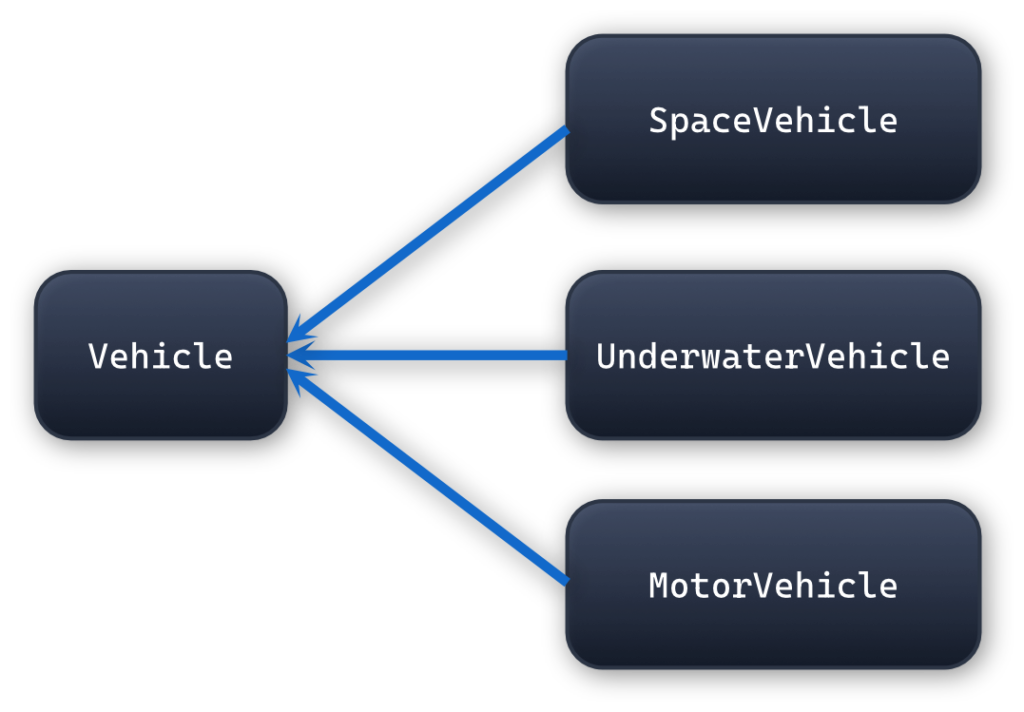
Name your classes with nouns. If you have an object hierarchy where classes inherit from each other, consider using adjectives for the derived classes.
Example:
Use the same idea when naming interfaces too.
Avoid vague names at all costs
Names like “data” or “temp” or “Class1” indicate careless writing, or writing in a rush, or even worse, overlooked code reviews
Readability
Use var with caution
Use var when the type is explicitly stated either on the right or left-hand side.
For example, avoid doing this:
var stream = OpenStream();instead prefer either of these:
var stream = new FileStream(...); or:
FileStream stream = new(...); The problem with the first line is that the reader has no way of knowing the type that we are dealing with. We use var on the left-hand side, and we call a method on the right-hand side. The developer is forced to move their mouse over “var” or the name of the method to see the type involved in this statement. Even worse if they are in an environment where IntelliSense is not available (i.e., when they are reviewing a PR)
Remove unnecessary namespaces
Always remove unnecessary namespaces; it’s not difficult to memorise the keyboard shortcut Ctrl-R, Ctrl-G. It’s not the end of the world if your files have unused namespaces (it doesn’t have any effect on the running program), but the namespaces are the first thing that someone sees when they open a file. When they see a bunch of lines greyed out, they will get the impression of untidy and messy code. It may also give an unpleasant indication of what happened in the file in the past. Lastly, they save valuable vertical space.
Use the digit separator
Use the digit separator for very large numbers. e.g.: 1_000_000 instead of 1000000. Semantically, they are the same, and your readers will thank you
Avoid single-line statements
Consider the following code:
if (_total > 100) return 0;
if (IsNextDayDelivered()) return 10.99;At first glance, it may not look as terrible, but picture these if statements buried somewhere within a long method.
Instead, put the return statement on a new line:
if (_total > 100)
return 0;
if (IsNextDayDelivered())
return 10.99;On a personal note, I don’t mind not using braces on single-line statements as long as the statement is clearly separated from the statement in the next line (either with an empty line or change of indentation)
Limit your line length
It’s much more difficult for the eye to follow a very long line horizontally. It’s a lot easier if you break it down into separate lines. Use consistent indentation for each sub-line and agree with your team on the line length limit (usually 80-120 characters). For the same reason, newspapers use columns.
Consider using named arguments
When a method has many arguments, it’s often difficult to understand what variable corresponds to which argument. In order to solve this problem, we can use named arguments. Consider the following method and two calls to it:
void Main()
{
Order order1 = CreateOrder("913597357427", "PQ319746854", 98, 37d, 18.34d, true, false);
Order order2 = CreateOrder(
orderId: "913597357427",
customerId: "PQ319746854",
subTotal: 98,37d,
taxAmount: 18.34d,
isGift: true,
isGuestCheckout: false);
}
Order CreateOrder(
string orderId,
string customerId,
double subTotal,
double taxAmount,
bool isGift,
bool isGuestCheckout
)
{
// ...
}On line #3, it is unclear which argument each value corresponds to. Plus, the line is starting to become lengthy. On line #4, we use named arguments to indicate to the reader that each value is, and we break it down into separate lines to improve readability further. Remember that when using named arguments, you can send the arguments in any order.
Another use of named arguments is a much simpler method which receives only a boolean argument:
void Main()
{
MarkAsDeleted(true);
MarkAsDeleted(false);
MarkAsDeleted(raiseEvents: false);
}
void MarkAsDeleted(bool raiseEvents)
{
// ...
}In this example, even though we have only one argument, the value true/false doesn’t really say much about its purpose. So, we use the argument name raiseEvents to help the reader understand that the value true/false is about “raising events” (whatever that would mean in such a class).
Avoid magic strings/numbers
The main problem with magic strings and numbers is that they give no indication of what they are used for. Consider the example of an Order in the following example. You can assume _total is a private instance variable and IsNextDayDelivered a class method.
public class Order
{
public double CalculateShippingCost()
{
if (_total > 100)
    return 0;
if (IsNextDayDelivered())
    return 10.99;
return 4.99;
}
}In this example, the reader has no way of knowing what the numbers 100, 10.99 and 4.99 mean. One way to solve this problem is to add a comment describing each number. But this creates a series of other problems:
- What if the same number/string appears in different places in your code?
- What if you decide to change the value of one of these numbers in the future?
- What if a developer misspells a number/string?
One way to avoid all these problems is to use constants. Consider creating a separate static class and putting them in there like so:
public static class OrderConstants
{
    public const double FreeShippingThreshold = 100.0;
    public const double Premium = 10.99;
    public const double Standard = 4.99;
}

public class Order
{
   public double CalculateShippingCost()
   {
        if (_total > FreeShippingThreshold)
            return 0;

        if (IsPremiumShipping())
            return Premium;

        return Standard;
   }
}It doesn’t really matter where you define your constants. It could be within the same class, in a separate class or in a separate assembly if that makes sense in your scenario.
Remove unused code
Do not commit commented-out code. In the same vein as removing unused namespaces, unused code can cause confusion or tempt future developers to use that code if they need it. This would be a terrible idea, considering that unused code most likely has not been maintained. Remember that the source code history is always there.
Comments
Write meaningful comments.
This is probably the most challenging of all because different people mean different things. My advice here is to show intent, purpose and clarify lines of code that may seem blurry without stating the obvious.
❌ Bad example:
public static bool IsEven(int number)
{
 // Check if the number can be divided by 2 with no remainder
 // If the remainder is 0, the number is even; otherwise, the
 // number is not even
    return number % 2 == 0;
}✅ Good example:
public static bool IsEven(int number)
{
 // An even number is any integer divisible by 2 without
 // a remainder. The modulo operator (%) returns the
 // remainder of division.
    return number % 2 == 0;
}📝 Disclaimer
These are just a few guidelines that have worked well for me over the years. These are the same I’m looking for and appreciate when I’m reading or reviewing code. I try to write code thinking of the person who will read it later, not just what’s more convenient for me at that moment. And this is how new guidelines are born. If something works for me and my team, I stick with it. If it doesn’t, I drop it or adjust it.
🏁 Conclusion
Readable code means different things to different people, making it a massively subjective topic. Something that seems counterintuitive to you might as well not be for someone else. This is why I did my best to stay clear of dubious topics like “excessive abstraction”, “DRY” or “functions should be small”.
The other topic I decided not to address is coding conventions. This is an area where literally there’s no “right” or “wrong” and consistency plays the most important part.
My advice would be to avoid dogmatic approaches like “always do it this way” or “never do it like that”. Code is about freedom, and rules are meant to be broken. You are free to break them, just make sure you have enough arguments to do so.
Make sure to keep your “coding guidelines” file up to date.
Happy coding!
Thanos