
Introduction
Expression trees are data structures that represent C# code. Consider the following code:
Func<int, int> calcSquare = number => number * number;This is represented in memory as:
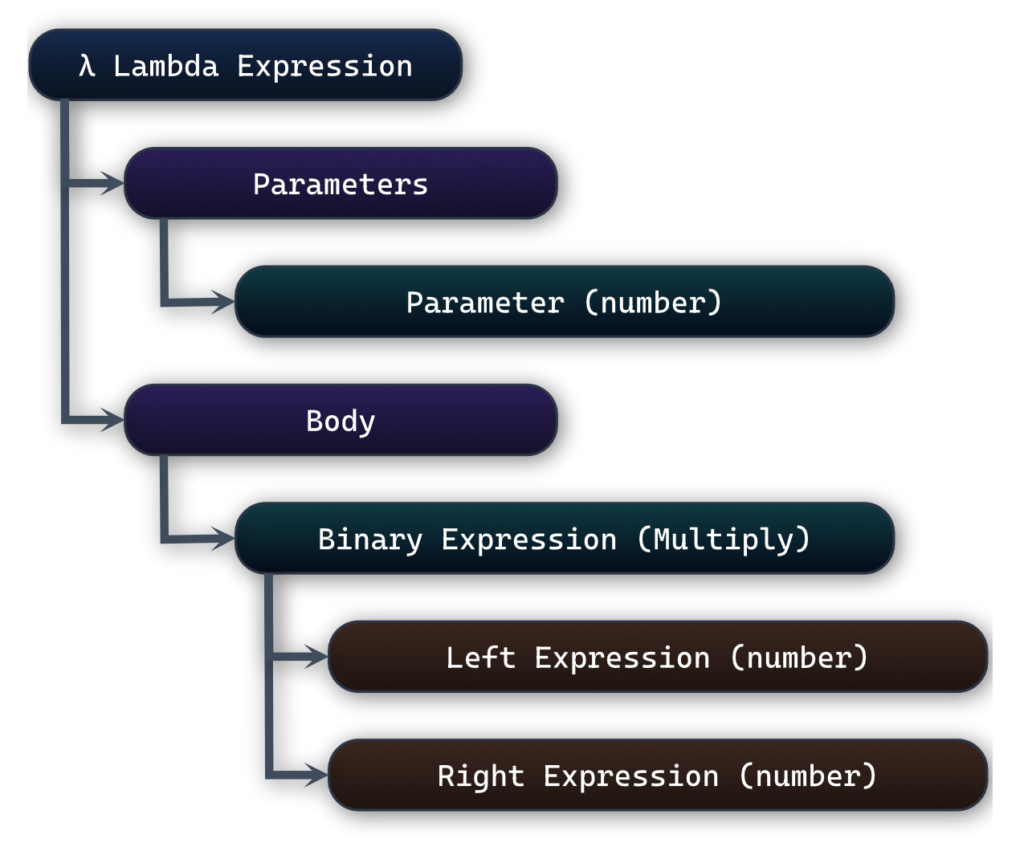
This data structure represents our code; It is not runnable code. It is a description of the code. If you are familiar with compiler theory, you can think of them as relatives of ASTs (even though not quite). However, unlike ASTs, expression trees are constructed and preserved at runtime.
We can mainly do three things with expression trees:
- Convert it to another language. This is the core idea of LINQ-to-SQL and Entity Framework.
- Analyze it and extract information about the code it represents.
- Generate code, compile it and execute it, all at runtime.
We will take a look at how to do these things in a moment, but first let’s explore how we can create them.
🏗️ How to construct Expression Trees
There are two ways we can construct an Expression Tree. a) using a set of APIs or b) using the C# syntax itself (as confusing as it sounds). Next, we will explore both of them.
Using the System.Linq.Expressions APIs
Our first option is to use a set of LINQ libraries to describe what we want our code to do. Our previous example would turn into:
ParameterExpression param = Expression.Parameter(typeof(int), "number");
BinaryExpression multiplication = Expression.Multiply(param, param);
Expression<Func<int, int>> lambda = Expression.Lambda<Func<int, int>>(multiplication, param);
The System.Linq.Expressions namespace contains a hierarchy of classes that enable C# expressions to be represented as objects. We create those objects by calling the static methods on the Expression class.
All expression types (such as ParameterExpression, BinaryExpression, etc) inherit from the Expression class and many of the static methods accept Expression type parameters. This design enables complex code structures to be composed through the use of the Composite pattern.
Using the C# syntax itself
We know that we can assign a lambda expression to a delegate like so:
Func<int, int> calcSquare = number => number * number;In this line, the compiler will treat the lambda as a method, compile it to executable code and assign it to the calcSquare delegate. But we could tell the compiler: “Instead of executing the lambda, use it to build an Expression Tree”. Consider this:
Expression<Func<int, int>> calcSquareExpr = number => number * number;This line changes the behaviour of the compiler. Instead of compiling a delegate, the compiler will generate a tree-like representation of the logic. This is one of the fundamental properties of Expression Trees; they use the syntax of the language itself to describe the structure of the code as an object-based hierarchy. They are transforming C# code into a data structure that describes it.
The Func<int, int> delegate in Expression<Func<int, int>> has no literal meaning. It just acts as the signature that the lambda must obey. It tells the tree: “You must take an integer as input and return an integer as output.”
When we use this approach to construct an Expression Tree, we must always begin with a lambda. A lambda expression is at the root of an Expression Tree. However, this is not the case when using the System.Linq.Expressions APIs.
The limitation is that Expression Trees cannot model the entirety of the C# syntax. In fact, they can model only a subset of it. Take a look at this link for a list of C# features that cannot be used.
Now what?
Whichever way we choose to construct our Expression Tree, we will end up with some Expression object. So now what can we do with it? As we mentioned in the beginning, we can either transform it into executable C# code and run it, or we could inspect it and do interesting things with it.
🪄Compile and Execute Expression Trees
The first and easiest thing to do is to execute the code that the lambda points to. As we mentioned in the previous section, whichever way we choose to create an Expression Tree, we will end up with an Expression<Func<int, int>> object. This object contains the data structure that represents our code. Now that we have it, we can compile it into a delegate and execute it (continuing from the example in the “Using the System.Linq.Expressions APIs” section):
// ...continuing from the section "Using the System.Linq.Expressions APIs"
Func<int, int> compiledFunc = lambda.Compile();
Console.WriteLine(compiledFunc(4));The Expression class contains a Compile method. This method transforms the embedded Expression Tree structure into executable code. The executable code is the delegate which performs the square operation. Remember that up until this moment, the code represented by the Expression object was just a data structure. Once we get the delegate, we can execute it like any other delegate.
Transform Expression Trees
Executing Expression Trees is only one of the many things we can do with them. What’s even more common (and interesting) is to transform them into another language. Let’s take a look at some methods that inspect a bunch of Expression Trees and generate the WHERE clause of a SQL query:
public static void Main(string[] args)
{
    Expression<Func<Person, bool>> expr1 = p => p.Name == "Alice";
    Expression<Func<Person, bool>> expr2 = p => p.Age > 18 && p.ShoeSize == 42.5;

    string? sql1 = "WHERE " + ExpressionToSql(expr1.Body);
    string? sql2 = "WHERE " + ExpressionToSql(expr2.Body);

    Console.WriteLine(sql1);
    Console.WriteLine(sql2);
}

private static string ExpressionToSql(Expression expression)
{
    if (expression is BinaryExpression binaryExpr)
        return ExpressionToSql(binaryExpr.Left) + " " +
               ExpressionTypeToSql(expression.NodeType) + " " +
               ExpressionToSql(binaryExpr.Right);

    if (expression is MemberExpression memberExpr)
        return memberExpr.Member.Name;

    if (expression is ConstantExpression constantExpr)
        return "'" + constantExpr.Value?.ToString() + "'";

    return "?";
}

private static string ExpressionTypeToSql(ExpressionType expressionType)
{
    if (expressionType == ExpressionType.AndAlso)
        return "AND";
    else if (expressionType == ExpressionType.Equal)
        return "=";
    else if (expressionType == ExpressionType.GreaterThan)
        return ">";
    else
        return "?";
}This example is intentionally simplified and ignores strict SQL syntax
When we run this, we should get the output:
WHERE Name = 'Alice'
WHERE Age > '18' AND ShoeSize = '42.5'The main point of interest in this code is the ExpressionToSql method. This method analyses the structure of the Expression object and decides what SQL code to generate for each type of expression it encounters. Remember that the Expression object holds the structure of the delegate’s code.
Some notes about this code:
- BinaryExpression is a type of expression that holds two subexpressions, the Left and the Right Expression. When our method encounters such an expression, it calls itself recursively to analyze the subexpressions (lines 16-18).
- MemberExpression represents an expression that accesses a member of a class. For example, p.ShoeSize. In our case, we’re only interested in the name of the member; this is why we return memberExpr.Member.Name (line 21)
- ConstantExpression represents any constant value in our code. For example, 18 and 42.5 on line 4.
- ExpressionType is an enumeration that represents all the possible C# expression types. In our code, we only support the binary expressions &&, == and >
- We use the helper method ExpressionTypeToSql to analyze the type of the binary expression we are currently on.
🔑Key Takeaways
- Expression Trees represent C# code as a data structure.
- Expression Trees do not run code; they describe it.
- There are two ways we can construct them:
- Using the System.Linq.Expressions APIs
- Converting from a lambda expression
- Once we have an Expression object, we can:
- Generate runnable code by creating a LambdaExpression object and calling the Compile method.
- Analyze it.
- Expression Trees do not support the entirety of the C# syntax.
- Expression Trees must be rooted at a lambda expression in order to be compiled and executed.
- We can use the ExpressionVisitor class to simplify and safeguard tree traversal.
- Expression Trees allow the code to become inspectable enabling Metaprogramming
🏁 Conclusion
Expression Trees is a valuable skill that every modern C# developer should have in their toolbox. Most of us use them daily without even realising – this is the power of C#. But in order to harness their real benefits we must use them deliberately and incorporate them in our designs.
In this article I covered the basics and most common use cases of Expression Trees. I also focused on areas that I believe are a source of confusion for developers, as they have been for me. The true depth of Expression Trees extends well beyond the scope of this article and it’s worth exploring in future posts.
Happy coding!
Thanos